Built from the problems we fix on client sites, and run on every monthly SEO client’s WordPress site in
Atlanta, GA and Greenville, SC.
Why an SEO agency built its own WordPress plugin
Most of the WordPress sites that come to us have the same problems. The
schema is missing or wrong. Old pages 404 because nobody set up the
redirects. Half the titles are duplicates. And the SEO plugin that was
supposed to handle all of it keeps the useful parts behind an upgrade
prompt.
So we built the plugin we wanted to install on those sites.
AlmaSEO SEO Playground is free in the WordPress.org
directory, and the free version is the whole plugin: there is no premium
tier inside it and no feature waiting behind a paywall. It runs on your
own server, on as many sites as you like, with no account.
It is the plugin we run on every one of our monthly SEO clients’
WordPress sites, and we would not use anything else. The tools you
install are the same ones we rely on for paying clients.
It is the same thinking we bring to our SEO work
and our WordPress builds: do the
fundamentals properly, keep the site lean, and do not make anyone pay for
the basics.
Free, with no premium
tier and no licence key
Runs locally, with no
account needed
Replaces the redirect,
schema and sitemap plugins you may be stacking now
Imports your settings
from Yoast, Rank Math, AIOSEO and five others
Full disclosure: the plugin is published under AlmaSEO, the SEO software
company we also run. You do not need an AlmaSEO account to use it.
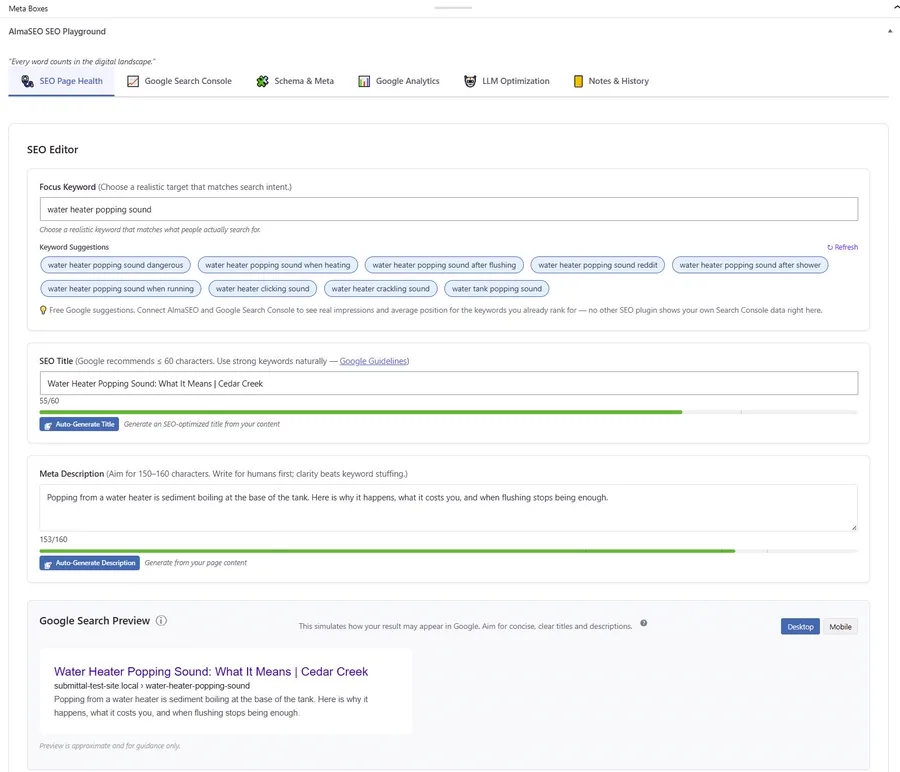
The panel you work in on every post: focus keyword, title and description with length guides, and a preview of how the page may look in Google.
what's in it
Everything in the free plugin
On-page SEO
Title, description and focus keyword with a live Google-style preview, a single health score per page, and readability and headline checks that run as you write.
Schema and structured data
JSON-LD for articles, FAQs, how-tos, products, events, recipes, people and organizations, set per page. Site-wide schema starts switched off, so nothing is published you have not reviewed.
Local business schema
154 LocalBusiness sub-types, so a dentist publishes as a dentist and a plumber as a plumber, plus structured address, phone, opening hours, split shifts and holiday hours.
Technical SEO
XML, news, video, image and HTML sitemaps, IndexNow, a robots.txt editor, a canonical health check, and LLMs.txt for the answer engines.
Redirects and 404s
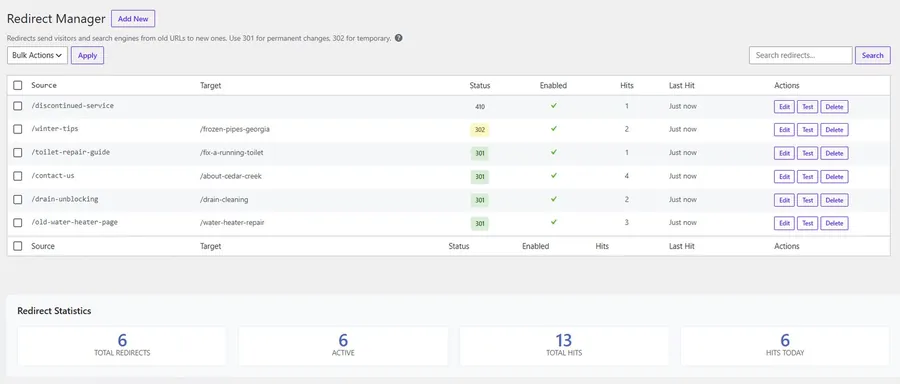
A full redirect manager with hit counts, a redirect offered the moment you trash a post, and a 404 log that warns you when the error rate spikes.
Bulk editing and upkeep
Edit titles and descriptions across the whole site in one table, with backups and one-click undo, plus orphan-page detection, a stale-date scan and a guardrailed internal auto-linker.
WooCommerce
Product schema with price, availability and SKU, products and product categories in the sitemap, and per-product control over indexing.
Moving off another plugin
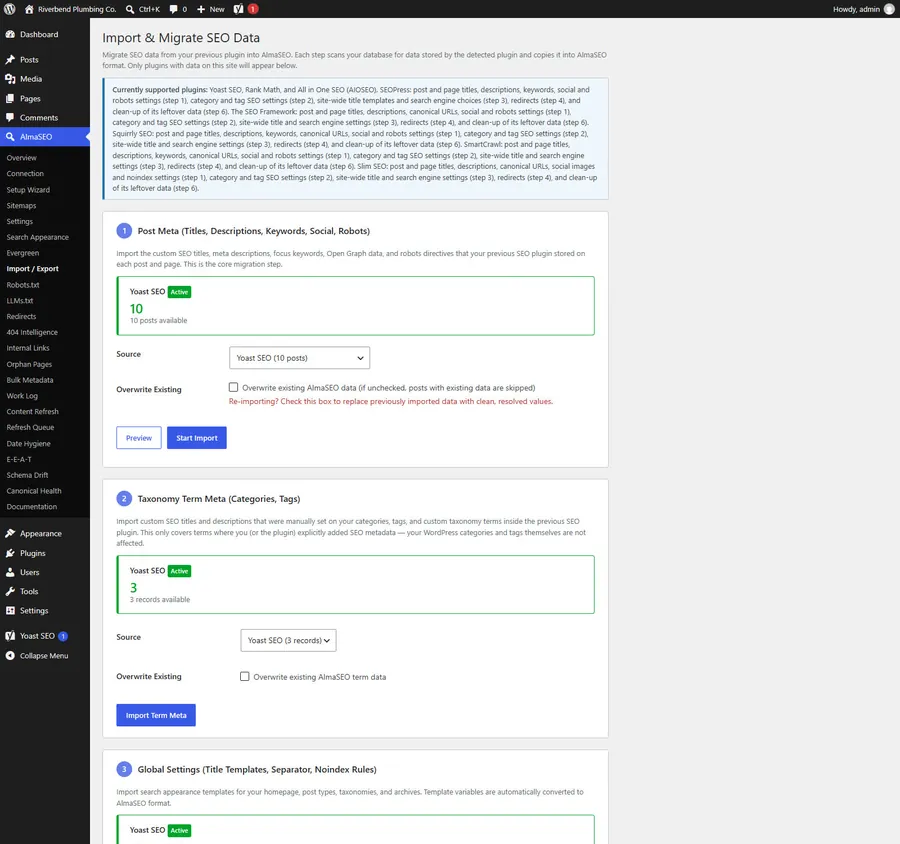
A step-by-step import from Yoast, Rank Math, All in One SEO, SEOPress, The SEO Framework, Squirrly, SmartCrawl and Slim SEO, with a verification report at the end.
The redirect manager on a demo site: 301s, a 302 and a 410, each with its hit count. No upgrade prompt anywhere in the table.
getting started
Up and running in a few minutes
01
Install
In WordPress go to Plugins, then Add New, search for AlmaSEO SEO Playground, and click Install Now. No zip file, no licence key.
02
Run the setup wizard
Activate it and the wizard walks through the site basics on first run. Coming from another SEO plugin? Run Import & Migrate before you deactivate the old one.
03
Work page by page
Open any post and the SEO panel is there: health score, preview, schema. Updates arrive through WordPress like any other plugin.
Import & Migrate on a test site running Yoast. Each step counts what it found before you commit to anything, and nothing is overwritten unless you tick the box.
Free, with no account
Every feature listed above
On any number of sites
Nothing leaves your server while you use them
Updates through WordPress, like any plugin
Needs an AlmaSEO account
Search Console and Analytics data inside the editor
Content-freshness and E-E-A-T analysis of the writing itself
We know the job. The client sites that arrive carrying someone else’s
setup. The per-site licence fees that keep adding up. The evenings spent
fixing the same redirect and schema problems one more time. We built this
plugin to make that work easier for us, and we would genuinely love for it to
make it easier for you too.
Put it on as many client sites as you like, free. And once you have had a
chance to try it, we would love to hear from you: what works, what bugs you,
what you wish it did. Agencies telling us how they really work is how the
plugin gets better for all of us.
Yes. There is no premium version of the plugin and no licence key. Everything on this page runs on your own server, on as many sites as you like, without an account. The few features that need an AlmaSEO account are listed above, and they need one because they cannot run inside WordPress, not because we held them back.
Because the basics should not cost a monthly fee. We spend our days fixing the same problems on WordPress sites: missing schema, broken redirects, duplicate titles, a sitemap nobody submitted. A plugin that handles those properly makes every site better, including the ones we will never work on. It is also the plugin we run on every one of our monthly SEO clients’ WordPress sites, so it gets used and improved on real sites every day. If you later want help with the parts a plugin cannot do, you know where we are.
Not usefully, and you should not want to. Two SEO plugins writing titles and schema to the same page leads to duplicate canonicals and conflicting instructions for Google. The plugin detects the conflict and stands down rather than fighting for the output. The intended path is to import your data with the migration wizard and then deactivate the old plugin.
No. The import wizard reads titles, descriptions, category and tag settings, site-wide templates and redirects from Yoast, Rank Math, All in One SEO, SEOPress, The SEO Framework, Squirrly, SmartCrawl and Slim SEO, converts their template variables so your titles read the same, and lists anything it cannot bring across with the reason. A verification report runs at the end.
Yes. The SEO fields live in a panel on the post editing screen, not in blocks, so page-builder and Classic Editor sites get the full feature set. The FAQ, How-To and Table of Contents blocks are an extra for people using the block editor.
Yes. If you would rather not do the migration or the schema yourself, we can install and configure it as part of our WordPress or SEO work, or review a setup you have already done. Get in touch and tell us about the site. Need a feature the plugin does not have? We also do custom WordPress plugin development.
Absolutely, and we would love that. We are an agency too, so we built it with your work in mind: no per-site licence, so it runs free on every client site you manage; an import from eight SEO plugins, so taking over a site is quick; and role-based access, so a client can edit their copy without touching technical settings. Give it a try, and please tell us how it goes. Your feedback makes it better for everyone who uses it.
/ new articles /
Get our next SEO guide in your inbox
We write practical SEO guides for small-business owners and the people who run their WordPress sites. Tell us what you’re interested in and we’ll email you when a new one is out. No sales pitches, and you can unsubscribe in one click.
get in touch
We are always ready to help you and
answer your questions
Tell us your website and what you are trying to rank for. We will
look at where you stand today and come back with what is actually
holding you back — no charge, no obligation.