












Most business owners who pay for SEO can’t say for sure whether it’s working. They get a monthly email, maybe a PDF with a few charts going up and to the right, and they pay the invoice. Ask them what was actually done last month and what it changed, and most can’t answer. That isn’t their fault. Most SEO reporting isn’t built to answer that question.
We’ve done SEO for clients since 2007. In nineteen years, the conversations that go best are the ones where the owner can see two things side by side: the work we did, and what happened to their traffic and leads afterward. This guide is about getting that view, whoever does your SEO.
It covers what an SEO company should actually be doing, which numbers matter, what a good monthly SEO report looks like, and the red flags to watch for. Then it gets to the question most guides skip: whether you need to hire anyone at all. In our experience, a lot of owners can do this themselves with the right tool. What usually stops them isn’t skill. It’s time.
Full disclosure: this guide mentions two businesses, and we run both. WebStuffGuy is our SEO and web design agency. AlmaSEO is the SEO platform we built and use for our own clients. We’ll be clear about when each one makes sense, including when neither does.
1. What does an SEO company actually do?
Before you can judge a report, it helps to know what the work is. Good SEO for a small or local business usually falls into five buckets:
- Technical fixes: making sure Google can find, crawl and index every page that matters. Broken links, slow pages, pages accidentally hidden from Google, missing titles. This is the plumbing. Nobody sees it when it works.
- On-page work: page titles, descriptions and headings that match what customers actually search for. Often the quickest wins are pages that already show up in Google but don’t get clicked.
- Content: new pages and articles that answer the questions your customers ask, plus keeping old pages accurate.
- Local presence: your Google Business Profile, reviews and listings on other directories. We wrote a whole Google Business Profile optimization guide on this part.
- Reputation and links: getting your business mentioned and linked from other real websites, which is how Google judges how well known you are.
Not every business needs all five every month. But every month, you should be able to see which of these were worked on, and what specifically was done. Google’s own Do you need an SEO? page describes the same kind of work, and it’s worth reading before you hire anyone.
2. The SEO metrics that matter (and the ones that don’t)
Most of the SEO metrics worth tracking come straight from Google, for free. The ones we’d put at the top of any report for a small business:
- Clicks from Google search: how many people clicked through to your site from Google’s results. This is the closest thing to “is SEO working” in a single number. It comes from Google Search Console.
- Impressions: how many times your site appeared in search results at all. Impressions usually rise before clicks do, so they’re an early sign that work is landing.
- The searches you show up for: the actual words people typed. Are they the services you sell, in the places you serve? Ranking for the wrong words is a common hidden problem.
- Average position: useful as a trend, not as a score. It moves around as you start appearing for new searches, sometimes downward while traffic goes up.
- Leads: calls, form fills, booking requests and direction requests. This is the number that pays the bills. Your website analytics and your Business Profile’s Performance page both track parts of it.
SEO KPIs to be skeptical of
- “Domain authority” and similar scores. These are made-up scores from SEO tool companies, not something Google uses. They can be handy for comparing sites, but a report that leads with them is avoiding the real numbers.
- Rankings for words nobody searches. “We got you to #1 for best licensed plumber in north Elm Street.” Great, if anyone ever typed it.
- Raw keyword counts. “You now rank for 1,200 keywords” usually means most of them are on page 5.
- Traffic with no context. A busy season can double traffic without anyone doing anything. Compare to the same month last year, not only to last month.
3. What a monthly SEO report should show you
A good monthly SEO report answers four questions in plain English, on one or two pages:
- What did you do? A specific list. “Rewrote the titles on the five service pages,” “published an article on water heater repair costs,” “fixed 14 broken links.” Not “ongoing optimization.”
- What changed? Clicks, impressions and leads, compared to last month and the same month last year, so seasonality doesn’t fool anyone.
- What does it mean? A short note from a person. Numbers go down sometimes. A good report says why, honestly.
- What’s next? What’s planned for next month, and why that over everything else.
The first question is the one most reports skip. When the work and the results live in separate places, the work list in someone’s head and the results in a chart, you can’t connect them. That gap is the reason we ended up building our own reporting, which we’ll get to below.
One more thing a good report needs: your own access to the data underneath it. You should be an owner of your Google Search Console, your Google Analytics and your Business Profile, not just a viewer of someone else’s screenshots.
Want a second opinion on the reports you’re getting now? Send us one and we’ll tell you what it does and doesn’t show.
Get a second opinion4. SEO report red flags (and how to choose an SEO company)
These are the patterns we see most when a new client brings us their old reports:
- You don’t own your accounts. The agency set up your Search Console, Analytics or Business Profile under their own login. If you part ways, your history goes with them. Ask to be made the owner, today.
- No list of work. Every report is charts and none of it says what anyone did.
- Only rankings. Rankings with no clicks, traffic or leads next to them.
- Guaranteed #1 rankings. Nobody can promise that. Google’s own advice on choosing an SEO says to be wary of anyone who guarantees rankings or claims a special relationship with Google.
- Secret methods. If they can’t explain in plain English what they’re doing, assume you wouldn’t like the answer.
- The same report every month. Same charts, same paragraph, new date.
When you’re choosing an SEO company, ask to see a sample monthly report before you sign. It tells you more than the sales call will. Google’s guide to hiring an SEO also has a good list of questions to ask.
5. How long does SEO take, and is it worth it?
Longer than anyone selling it would like to admit. Google’s own estimate is that in most cases it takes four months to a year to put improvements in place and then see the benefit (source). New pages have to be found and indexed. Changes to existing pages take weeks to show up in the numbers.
That’s exactly why reporting matters. In months one to three, results are thin, so the only way to know things are on track is to see the work being done and the early signals: more pages indexed, impressions rising, new searches appearing. By month six you should be able to point at clicks and leads.
Is SEO worth it? For most local and service businesses, yes, because the traffic keeps coming without paying per click. But it’s worth it only if someone is actually doing the work, every month. That brings us to the cheapest way to check.
6. Free tools to check your own SEO
You can check whether your SEO is working without paying anyone. These are the free SEO tools every small business owner should have access to:
- Google Search Console: clicks, impressions, the searches you appear for, and whether Google has indexed your pages. If you only open one tool, open this one. The Performance report with the last 3 months compared to the previous 3 months is a five-minute health check.
- Google Analytics: what visitors do once they arrive, and which pages lead to calls and form fills.
- Your Google Business Profile’s Performance page: calls, direction requests and website clicks from Maps and search. Our GBP guide walks through what each number means.
The catch is that these are three separate tools with three separate logins, and none of them knows what work was done. They tell you what happened, not why or what to do next. Reading them well is a skill, and connecting them to the work is a chore. That’s the problem we set out to fix for ourselves.
For the full list of free and paid options, including WordPress plugins, keyword research, audits and local SEO tools, see our guide to SEO tools for small business.
7. Why we built our own SEO platform
For most of the time we’ve been doing this, our own workflow looked like everyone else’s: Search Console in one tab, Analytics in another, the Business Profile in a third, an audit tool, a rank tracker, a spreadsheet of what we did for whom, and a report pieced together from screenshots at the end of the month. The work was good. Showing it was slow, and the client still had to take our word for how the work connected to the numbers.
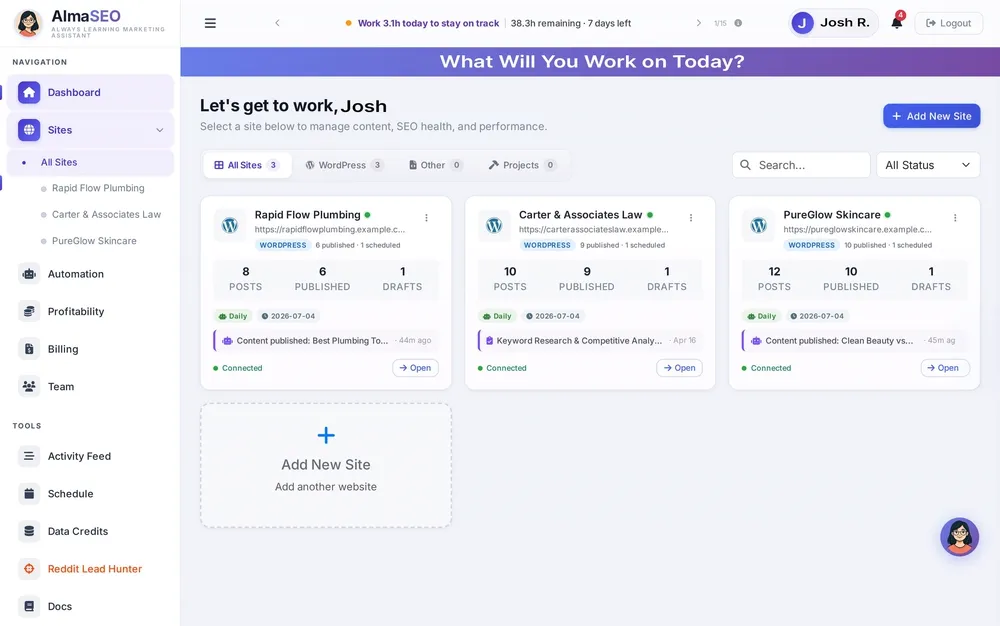
So we built AlmaSEO. Each website gets its own workspace, with its Google accounts connected: Search Console, Analytics, Business Profile, Ads and YouTube. Audits, keyword tracking, local rankings, content and publishing all happen in the same place, and everything done is recorded in one activity log. The report reads from the same place as the work, so “what did we do” and “what changed” finally sit side by side.
We built it for our own agency work, and we still use it on every client. Along the way, something we didn’t plan on became obvious.
8. Doing your own SEO with AlmaSEO
When you put all the pieces in one place, in the order you’d actually work through them, SEO stops being mysterious. We’ve watched clients use it and pick it up quickly: they can feel the order of things, from checking the site’s health, to reading the numbers, to seeing what needs work, to fixing it. A business owner who’s comfortable with their own website can genuinely run their own SEO with it.
A few of the things that make that possible:
- All your Google accounts in one dashboard, read together instead of in separate tabs.
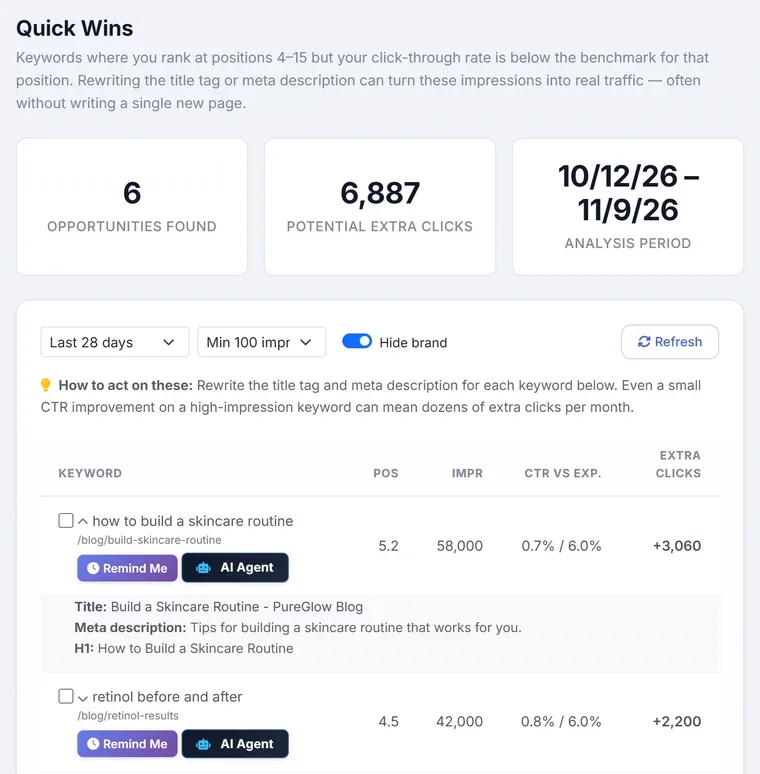
- Quick wins: searches where you already show up on page one or two but don’t get many clicks, with the page involved and what to change. These are often the fastest improvements available, because nothing new has to be written.
- Technical audits, keyword research and tracking, local rankings and citations, and a diagnosis when traffic drops.
- Writing and publishing articles, straight into WordPress, including the SEO fields your plugin already uses.
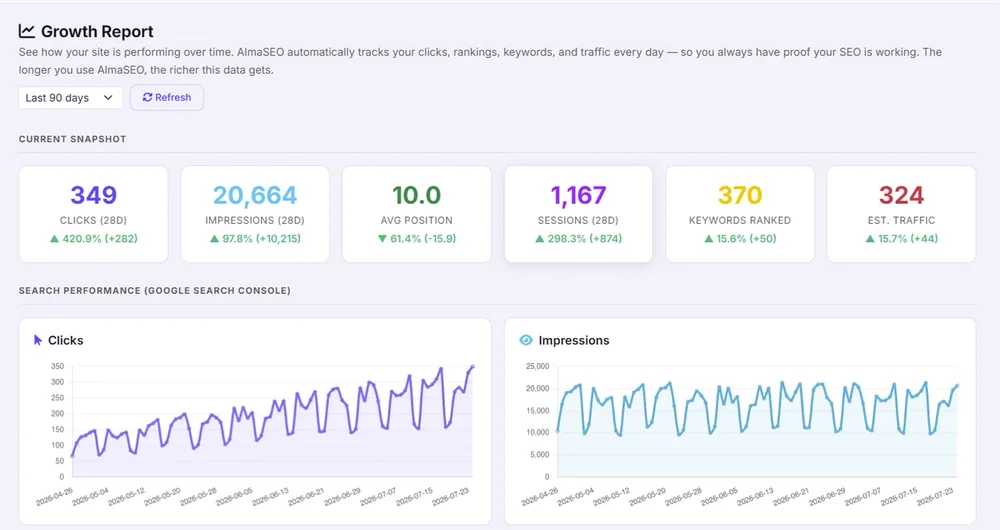
- A growth report that tracks your clicks, rankings and traffic every day, so you can see the trend for yourself.
About writing articles: the same rule we gave in our GBP guide applies here. Drafting with software is fine, and Google cares about whether content is helpful, not how it was written. But read every article before it goes live, and make sure everything in it is true for your business. You know your business better than any tool does.
What it costs
The Solo plan is built for business owners running their own sites. It’s $49 a month and covers up to 5 websites, with the same SEO tools as the agency plans. It includes 10 articles, 3 deep audits and 10 images a month (current pricing).
One thing to know up front: a few features use data credits, paid separately. Those are the ones that fetch live data from outside providers, like live search results, backlink lookups and checking what AI search engines say about you. Most of the platform never uses credits: audits, Search Console, Analytics, indexing, content, publishing and reporting are all included. Credits are pay-as-you-go, starting at $10 for a pack, they don’t expire, and the app shows you the cost before anything is spent.
Try it, and get a free lesson
You can click around a live demo with sample sites first, no signup needed. The 14-day free trial has every feature switched on. When you start a trial, we’ll email you and offer a free one-on-one video lesson to walk you through your own site: where to start, what your numbers mean, and what to work on first.
See it for yourself before you decide. The demo runs on sample sites, with no signup.
Open the AlmaSEO demo9. Do it yourself, or hire someone?
In our experience the deciding factor is almost never skill. It’s time. SEO isn’t hard so much as it’s steady: a few hours every month, every month, while you’re also running a business.
- Free tools only: right if your budget is zero and you can give it an hour a month. Set up Search Console, Analytics and your Business Profile, and check them monthly.
- Do it yourself with AlmaSEO: right if you’re comfortable with your own website and can give it a few hours a month. You get the whole picture in one place, in the right order, for a lot less than an agency.
- Hire someone: right if you’d rather spend those hours on your business. Whoever you hire, use the report checklist and red flags above to hold them to it.
Some clients start one way and switch. Owners who start on their own sometimes hand it to us when the business gets busy. Clients who’ve watched us work sometimes take it in-house. Both are fine. The point is that you can always see what’s being done and whether it’s working.
Rather hand it off? Our SEO services include a plain-English monthly report with the work and the results side by side, for businesses anywhere in the US.
See our SEO services10. Quick answers
What should be in an SEO report?
A specific list of the work done, the results (clicks, impressions, leads) compared to last month and last year, a short plain-English explanation, and the plan for next month. See what a monthly SEO report should show.
How do I know if my SEO is working?
Open Google Search Console and compare clicks and impressions for the last 3 months against the 3 months before, and against the same period last year. Rising impressions followed by rising clicks, on searches that match what you sell, means it’s working.
How often should I get an SEO report?
Monthly is the norm, and it’s the right pace. SEO changes take weeks to show up, so weekly reports mostly show noise.
Can a small business do its own SEO?
Yes. With the free Google tools and a few hours a month, many can. A platform like AlmaSEO puts those pieces in order so you know what to work on next. The usual limit is time, not ability.
Changes to this guide
- November 14, 2026: first published.