













A few times a month a client forwards me an email that makes it look like their domain is about to be cancelled. It is almost always the same kind of message, from a company they have never done business with. If you own a domain, you have probably had one too. Here is what these emails are, how to tell, and what to actually do about them.
The short version: if the email is not from the company where your domain is actually registered — the one you pay every year, whether that is GoDaddy, Namecheap, Cloudflare, Squarespace or someone else — it is not a renewal notice. Don’t click it, don’t pay it, delete it.
What these emails look like
They arrive with subject lines built to make your stomach drop: “Domain Notification for yourbusiness.com: This is your Final Notice of Domain Listing”, “Attention: Important Notice”, “Termination Notice”, “Domain name expiration notice”. The sender goes by something official-sounding like “Domain Notice” or “Domain Registration Service”, and the message uses your real domain, your real business name and sometimes your address.
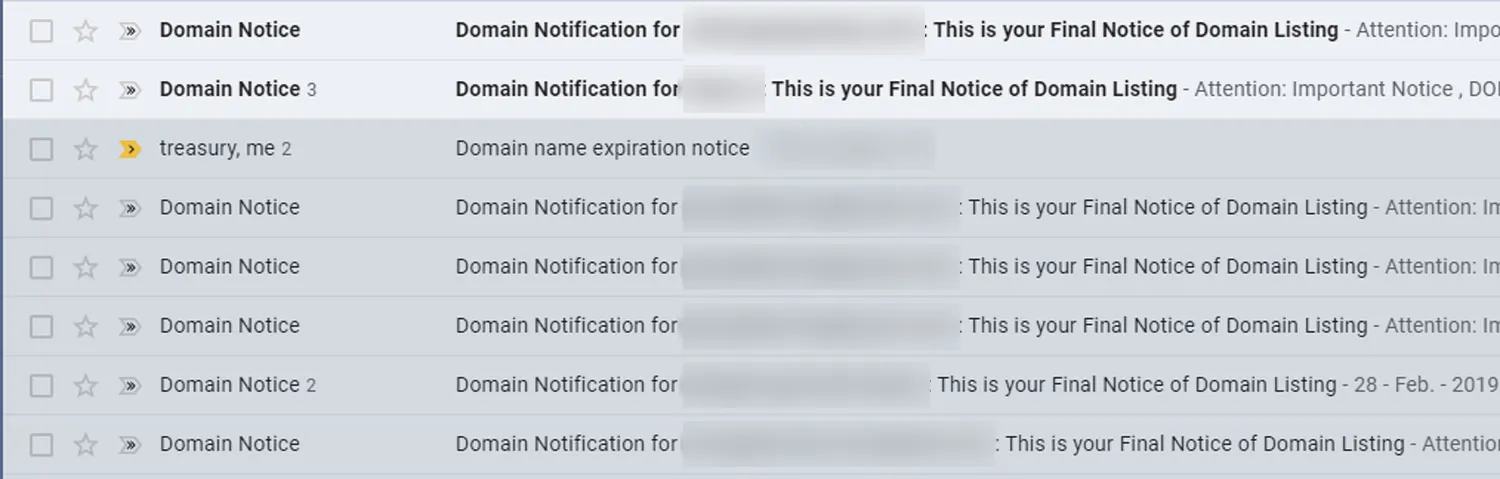
None of that means they know anything about your account. Your name and domain are public — in the domain’s registration record, in business directories and on your own website. Using them is what makes the email feel real.
What they are really selling
Read the small print on the “Domain Registration Service” style of notice and it usually admits it: this is not a bill and not a renewal. It is an offer for a “search engine submission” or “domain listing” service you never asked for and do not need — Google does not need anyone to submit your website to it. The whole message is written so that a busy owner skims it, sees “final notice” next to their own domain, and pays.
Other versions go further and pretend to be the company that holds your domain, complete with an invoice number and a deadline. Those are simply fraud.
A real one, line by line
This one reached a client in 2020 from an outfit calling itself “DomainWeb Station”. It came in through the contact form on their website. The quoted wording is theirs; the notes underneath are what it actually means.
- “Subject: yourwebsite.com Termination Notice”
- They have your domain and company name, so it reads as personal. Termination of what, exactly? You have never had an account with them.
- “This message is to inform you that your invoice no. 815082095 to be due on 2020-03-28 is SUSPENDED.”
- There is no invoice. The number is invented so it sounds as though you already owe money.
- “Please ensure that you make payment AS SOON AS POSSIBLE to avoid any TERMINATION of service to yourwebsite.com.”
- Your domain is repeated again and again so you assume it is the thing at risk. It isn’t. Nothing this company does can touch it.
- “Do take note that if no payment is made in the next 3 business days, your data will be purged and deleted.”
- The deadline is the pressure. Read literally, all they are threatening is to delete you from their own mailing list — which they won’t, because they will send the same email next year.
- “We can not be held legally liable for any claims, damage or loss that you may incur because of the cancellation of yourwebsite.com … monetary losses, deleted data without backups, loss of position in search rankings, missed appointments, undelivered email…”
- A list of frightening things that are not going to happen, because nothing is being cancelled.
- “For more information please refer section 19.a.3.f of our Terms of Service.”
- There is no agreement between you. The clause number is decoration.
- “SECURE ONLINE PAYMENT: https://domainwebstation.com/?n=yourwebsite.com…”
- And the point of the whole thing: a payment link with your domain already filled in.
How to check in two minutes
- Find out where your domain is really registered. Search your inbox for your domain name along with “renewal” or “receipt”. The company that has been charging you every year is the only one that matters. If you are not sure, ask whoever built your website.
- Log in there directly. Type the address yourself rather than following a link in any email, and look at the expiry date.
- Turn on auto-renew and check that the card on file has not expired. That, not any email, is what keeps a domain safe.
- Make sure the account email is one you read every day, so a genuine notice never goes unseen.
If the expiry date is a year or more away and auto-renew is on, every “final notice” you receive is noise.
How to get fewer of them
Keep your registration details private
Most registrars now hide your name, email and phone number from the public registration record, and many include that privacy at no extra charge. If your details are still showing, switch privacy on in your registrar account. It cuts down on these notices, and on the cold pitches for logos and websites that come with being listed.
Protect your contact form
When they cannot find your email address, they use your website’s contact form — which is exactly how the DomainWeb Station message arrived. A spam filter on the form, such as a hidden honeypot field, reCAPTCHA or Cloudflare Turnstile, stops most automated submissions.
Ask before you pay anything
If an email about your domain worries you, forward it to whoever looks after your website before you do anything else. We connect, transfer and renew domains for clients all the time, and telling a real notice from one of these takes about thirty seconds.
Reporting them
You can report these emails to the Federal Trade Commission at ReportFraud.ftc.gov, and mark them as phishing or spam so your email provider learns to filter them. Then delete them.
Scammers go after Google listings too. If a stranger has asked to take over yours, read what to do when someone requests ownership of your Google Business Profile.