











Search for “SEO tools” and you’ll find lists of fifty. Most were written by marketers for marketers, and most of the tools on them are priced for agencies. A business owner who wants to do their own SEO doesn’t need fifty tools. They need a handful, and most of those are free.
This guide covers the SEO tools for small business that are actually worth your time, grouped by the job they do: the free ones from Google, WordPress plugins, keyword research, site audits, rank tracking, local SEO and the newer AI search tools. For each one, we say when free is enough and when it’s worth paying. At the end there’s a do-it-yourself SEO toolkit for three budgets.
We’ve done SEO for clients since 2007 and have used most of these tools at some point. If you want the background on what to measure before choosing tools to measure it, start with our guide to SEO reporting and how to tell if your SEO is working.
Full disclosure: we built AlmaSEO, an SEO platform and a free WordPress plugin, and both appear in this guide alongside tools we don’t own. We run WebStuffGuy and AlmaSEO, and we’ve tried to be fair to both the free options and the competition.
1. You need fewer SEO tools than you think
Every SEO tool does one or more of six jobs. Before buying anything, know which job you’re buying it for:
- Measure: how many people find you on Google, for which searches, and what they do next.
- Fix: find technical problems that stop Google from reading your site properly.
- Edit: set page titles, descriptions and other on-page details.
- Research: find out what your customers search for.
- Track: watch where you rank over time, especially locally.
- Create: write and publish the pages and articles that answer those searches.
Google gives you most of the first job for free, and a WordPress plugin covers the third. Everything else has free options that get you started and paid options that save time. That’s the trade you’re making with any paid SEO tool: money for hours.
2. The best free SEO tools come from Google
If you set up nothing else, set up these. They’re free, the data comes straight from Google, and every paid tool is ultimately trying to estimate what these show you directly.
- Google Search Console: the most important free SEO tool there is. It shows the searches you appear for, your clicks and impressions, which pages Google has indexed, and problems Google found on your site. If someone tells you they’re doing your SEO and you don’t have access to this, ask why.
- Google Analytics: what visitors do on your site and which pages lead to calls and form fills.
- Your Google Business Profile: for local businesses, the Performance page shows calls, direction requests and website clicks from Maps. Our Google Business Profile optimization guide covers every section.
- PageSpeed Insights: how fast your pages load on phones and computers, and what’s slowing them down.
- Rich Results Test: checks whether the structured data on a page (reviews, FAQs, business details) is set up correctly.
- Google Keyword Planner and Google Trends: rough search volumes and seasonal patterns. More on these in keyword research.
Don’t forget Bing Webmaster Tools. It’s Bing’s version of Search Console, it’s free, and you can set it up in a couple of minutes by importing your site from Search Console. Bing’s results also feed other search tools, so it’s worth having.
3. SEO tools for WordPress
If your site runs on WordPress, an SEO plugin handles the editing job: page titles and descriptions, XML sitemaps, structured data (schema), redirects and the like. The well-known options are Yoast SEO and Rank Math, both with free versions and paid upgrades.
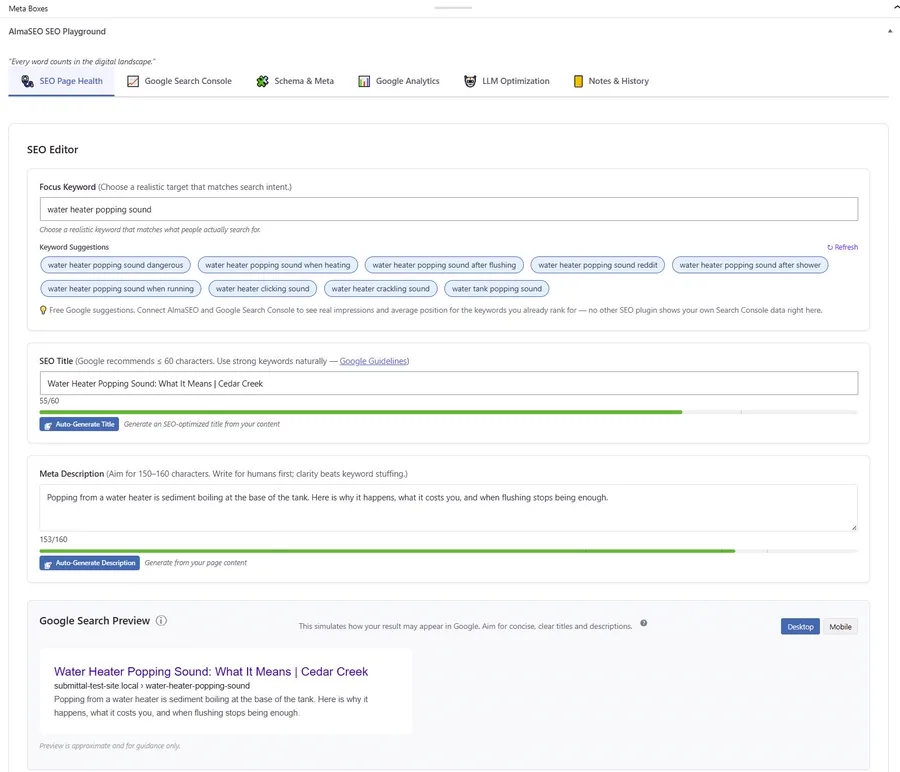
We also make one: the AlmaSEO WordPress SEO plugin, free on WordPress.org. The difference we built it around is that there’s no premium tier: schema, sitemaps, redirects, 404 tracking, readability checks and bulk editing of titles and descriptions are all in the free plugin, with no account needed. It can import your settings from Yoast, Rank Math, AIOSEO and several other plugins, so switching doesn’t mean starting over. If you connect it to an AlmaSEO account, it also shows your Search Console and Analytics numbers right inside the WordPress editor.
Whichever you choose, run only one SEO plugin at a time. Two plugins both writing titles, sitemaps and schema will fight each other, and Google ends up with duplicate or conflicting information.
Not on WordPress? Wix, Squarespace and Shopify have most of these settings built in. Look for them under the page or SEO settings.
4. Keyword research tools
Keyword research means finding the words your customers actually type, so your pages use them. The free options are better than most people think:
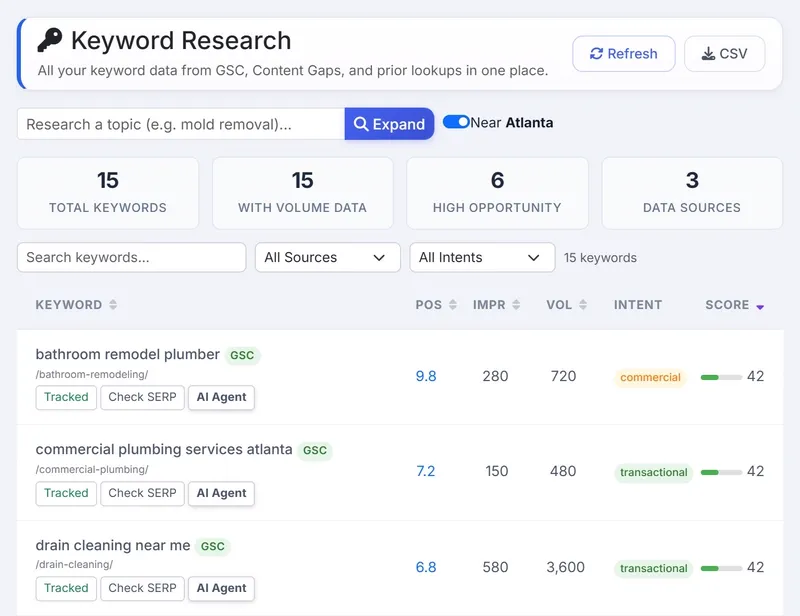
- Search Console’s query list is the best keyword source you have, because it shows searches where Google already shows your site. A search where you appear on page two is often one good page edit away from page one.
- Google itself: type the start of a search and look at the autocomplete suggestions, then scroll to “People also ask”. Those are real questions, free.
- Google Keyword Planner gives search volumes, but shows broad ranges (like “100–1K”) unless you’re running ads. Good enough to compare ideas, not to plan precisely.
- Google Trends shows whether interest is growing, shrinking or seasonal.
Paid keyword research tools add exact-ish volumes, a difficulty score for how hard each search is to rank for, and lists of related searches you wouldn’t think of. They’re worth it once you’re writing content regularly. For a five-page site, the free options are plenty.
5. Site audit tools and “SEO checkers”
A site audit tool crawls your website the way Google does and lists problems: broken links, missing titles, pages blocked from Google, redirect loops, slow pages.
- Search Console already reports the problems Google itself found, under Pages (indexing) and Core Web Vitals. Start there.
- Screaming Frog SEO Spider is a desktop crawler that’s free for up to 500 pages, which covers most small business sites. It’s powerful, though the screens are built for SEO specialists.
- Ahrefs Webmaster Tools gives a free site audit and backlink overview for websites you can prove you own.
Be skeptical of free “SEO checker” scores. Those one-click tools that grade your site out of 100 are mostly lead magnets. They flag things that don’t matter, miss things that do, and the score itself isn’t something Google uses. A list of specific problems is useful. A grade isn’t.
6. Rank tracking
A rank tracker checks where you show up for chosen searches, on a schedule, and keeps the history.
Search Console’s average position is the free version. It’s accurate about your real impressions, but it’s an average across every location, device and day, so it won’t tell you where you rank for “plumber” on a phone two miles from your shop.
That’s the main reason to pay for a rank tracker: local rankings change street by street. Someone searching from across town sees a different map and different results. If you serve a local area, a tracker that checks from your city, or several points in it, tells you far more than an average.
Don’t check rankings by Googling yourself. Your results are personalized by your location and history, so what you see isn’t what your customers see.
7. Local SEO tools
For a business that serves customers in a specific area, local SEO tools cover three things:
- Your Google Business Profile. Free, and the most important local tool by far. Our GBP guide walks through all of it.
- Citations: your business name, address and phone listed consistently on other directories such as Yelp, Bing Places and Apple Business Connect. You can claim these yourself for free. Paid tools find and fix inconsistent listings faster.
- Local rank tracking: where you appear for searches with your city in them, or from your area. See rank tracking above.
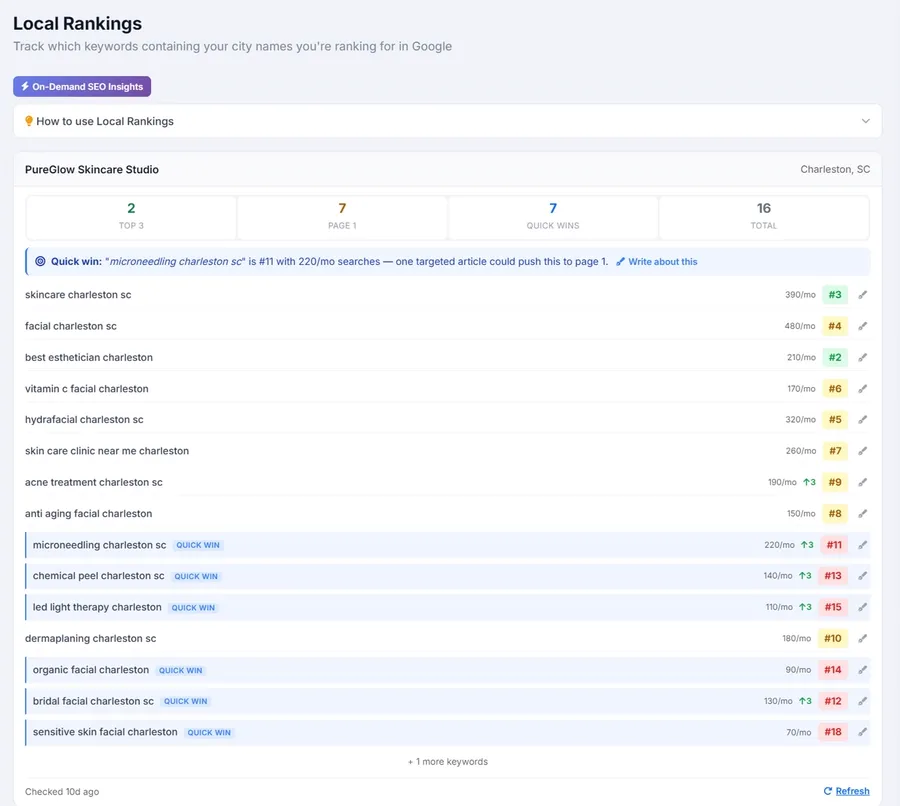
AlmaSEO’s local SEO tools put local rankings and citations next to the rest of your site’s SEO, and flag the city searches where you’re close to page one.
8. Tools for AI search
More people now get answers from Google’s AI Overviews, ChatGPT and similar tools before they ever click a website. This is the newest corner of SEO and the tools are young, so our advice is cautious:
- The basics still do the work. AI tools pull from websites that are clear, accurate and well-structured. Everything else in this guide helps here too.
- Ask them. Type the questions your customers ask into ChatGPT or Google, and see whether you’re mentioned. It’s free and surprisingly informative.
- llms.txt is a proposed file that summarizes your site for AI tools. Nobody has shown it improves visibility yet, but it’s harmless and quick. AlmaSEO has a free llms.txt generator that builds one from your sitemap, no signup needed.
Paid AI visibility trackers exist, including in AlmaSEO, and they’re useful for watching trends. For most small businesses, it’s too early for that to be the first thing you pay for.
9. The big all-in-one SEO suites
Semrush, Ahrefs, SE Ranking and Moz are the names on every “best SEO software” list. They’re excellent, and we’ve used several of them for years. They’re also built for marketing professionals: huge databases, competitor research across the whole web, dozens of reports. Their pricing reflects that.
For a business owner, the honest problem isn’t price. It’s that these tools show you everything and leave you to work out what matters for your site and what to do first. Many owners sign up, look around, and cancel. If you’re comfortable with SEO already, a suite is a great investment. If you’re learning, it’s a lot.
Prices change too often to print here. For a side-by-side with current prices, free options and local SEO coverage, AlmaSEO keeps a comparison of the best SEO tools for small business, checked against each vendor’s own pricing page. It’s our page, and AlmaSEO is on the list, so read it with that in mind.
10. Where AlmaSEO fits
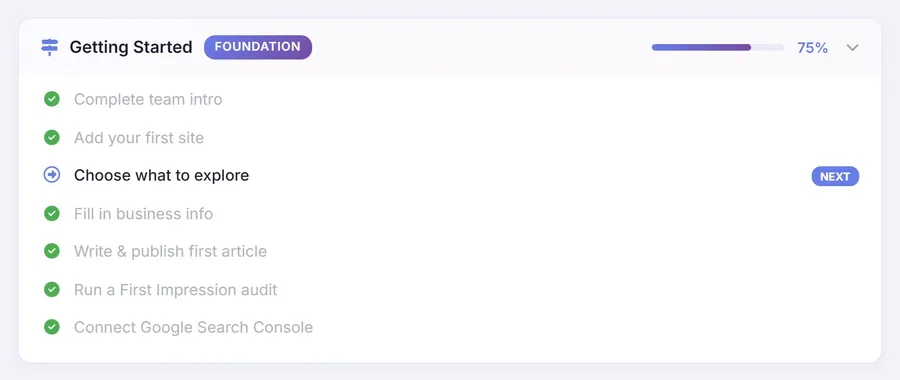
We built AlmaSEO for our own client work, and found it fills the gap between the free tools and the big suites. It connects your Google accounts (Search Console, Analytics, Business Profile, Ads and YouTube) and puts the jobs from section 1 in one place: audits, quick wins, keyword research and tracking, local rankings and citations, and writing and publishing articles straight into WordPress.
The part that matters for a business owner is the order. Instead of a wall of reports, it walks you from connecting your site, to reading your numbers, to what to fix next. In our experience, owners who’re comfortable with their own website pick it up quickly. What decides whether DIY SEO works out is usually time, not skill.
- Price: the Solo plan is $49 a month for up to 5 websites, with the same tools as the agency plans (current pricing).
- Data credits: a few features that fetch live data from outside providers, such as live search results, backlink lookups and AI answer checks, use pay-as-you-go credits. Most of the platform never touches them, and the app shows the cost before anything is spent.
- Try it: click around the live demo with no signup, or start the 14-day free trial. When you start a trial, we’ll email you and offer a free one-on-one video lesson on your own site.
We wrote more about doing your own SEO with it, and the trade-offs, in our SEO reporting guide.
See how the pieces fit before deciding. The demo runs on sample sites, with no signup.
Open the AlmaSEO demo11. Your DIY SEO toolkit, by budget
$0 a month
- Google Search Console, Google Analytics and your Google Business Profile
- Bing Webmaster Tools
- A free WordPress SEO plugin (or your website builder’s built-in settings)
- PageSpeed Insights and Screaming Frog’s free version, a few times a year
- Google autocomplete, “People also ask” and Keyword Planner for research
This is enough to do real SEO. The cost is your time: several tools, several logins, and working out yourself what to do next.
Around $49 a month
Everything above, plus one tool that ties it together in order and saves the hours. That’s the gap AlmaSEO’s Solo plan is built for.
When you’d rather not do it yourself
If the hours are the problem, not the tools, hand it off. Whoever you hire, make sure you still own your Search Console, Analytics and Business Profile, and that you get a report showing what was done. Our SEO reporting guide covers what to ask for.
Rather hand it off? Our SEO services cover the whole toolkit for you, with a plain-English monthly report, for businesses anywhere in the US.
See our SEO services12. Quick answers
What is the best free SEO tool?
Google Search Console. It’s the only tool that shows exactly which searches bring people to your site, straight from Google, and it’s free.
Do small businesses need paid SEO tools?
Not to get started. Free tools cover measuring, editing and basic research. Paid tools earn their cost by saving time and adding local rank tracking, deeper keyword data and guidance on what to do next.
Can I do SEO myself?
Yes. Most small business SEO is steady, unglamorous work: accurate pages, a complete Business Profile, a new article now and then, and fixing what the tools flag. The usual limit is time, not ability.
Which SEO plugin should I use for WordPress?
Any of the established ones will do the job. Pick one and run only that one. If you want everything free with no upgrade nags, the AlmaSEO plugin is built that way; it’s ours, so weigh that accordingly.
Changes to this guide
- November 14, 2026: first published.